If you are a photographer, you already know the problem. Shooting is exciting. Culling can be manageable. But album design? That is where too many beautiful projects go to lose momentum. Hours disappear. Good images get forced into bad layouts. Smart creative decisions get replaced by template wrestling. And what should feel like the final polish on a premium client experience starts to feel like admin work with extra frustration.
That is exactly why Spreadu grabbed my attention.
It is the kind of product story that is easy to get excited about, because it starts from a very real photographer problem: most photo album design software still asks you to compromise your photos to fit the software, instead of asking the software to adapt to your photos.
Spreadu flips that idea on its head.
Album design should not eat your weekend
Spreadu is a web-based album design platform for photographers built around one core belief: your photos should not be auto-cropped into submission just because a layout engine is lazy.
That point matters more than it sounds.
Anyone who has used older or more rigid album tools knows the pain. You spend a full wedding day chasing light, emotion, timing, gesture, and composition. Then you get back to your computer and a so-called smart layout tool slices into the frame because the slot is vertical, the template is fixed, or the software decided your image should behave like a puzzle piece instead of a photograph.
Spreadu was built as a reaction to that entire way of thinking.
Instead of treating album design like a template game, it treats it more like a creative system. You bring the photos. The engine builds layouts around them. You keep control. The software does the heavy lifting. That is a much more compelling promise than yet another “easy album creator” pitch.
What Spreadu actually is
At its core, Spreadu is album design software for photographers who want speed without losing artistic control. It is browser-based, so there is no old-school desktop app drama, no “install this first,” and no being locked to one machine when you want to work from somewhere else.
It is designed for photographers who sell albums, want to sell more albums, or simply want their post-shoot workflow to stop stealing evenings and weekends.
The product is especially relevant for:
- wedding photographers
- portrait photographers
- boudoir photographers
- studios that want a cleaner client proofing workflow
- photographers who are tired of template-heavy album tools
If you have ever searched for wedding album design software or photo album layout software and felt like every tool looked either outdated, overcomplicated, or creatively limiting, Spreadu is clearly aiming at that exact frustration.
Why Spreadu was built in the first place
What I like most about the product story is that it does not start with “AI,” “innovation,” or generic startup noise. It starts with a practical frustration photographers already understand: bad automation is not really automation if you have to fix everything afterward.
That is one of the most important differences here.
A lot of software promises speed, but what it really delivers is a first draft you still have to rescue. Spreadu was built around the idea that speed only matters if the result is already close to what a photographer would actually be proud to deliver.
The team talks about three big ideas behind the product:
- respect the frame instead of forcing crops by default
- generate layouts from the actual photo set instead of relying on rigid templates
- make album creation dramatically faster without making it look cheap
That is a strong foundation, because it speaks directly to both sides of the photographer brain: the creative side that cares about the image, and the business side that cares about time, delivery, and margin.
How Spreadu works in real life
The easiest way to understand Spreadu is to imagine a more modern, more flexible album workflow.
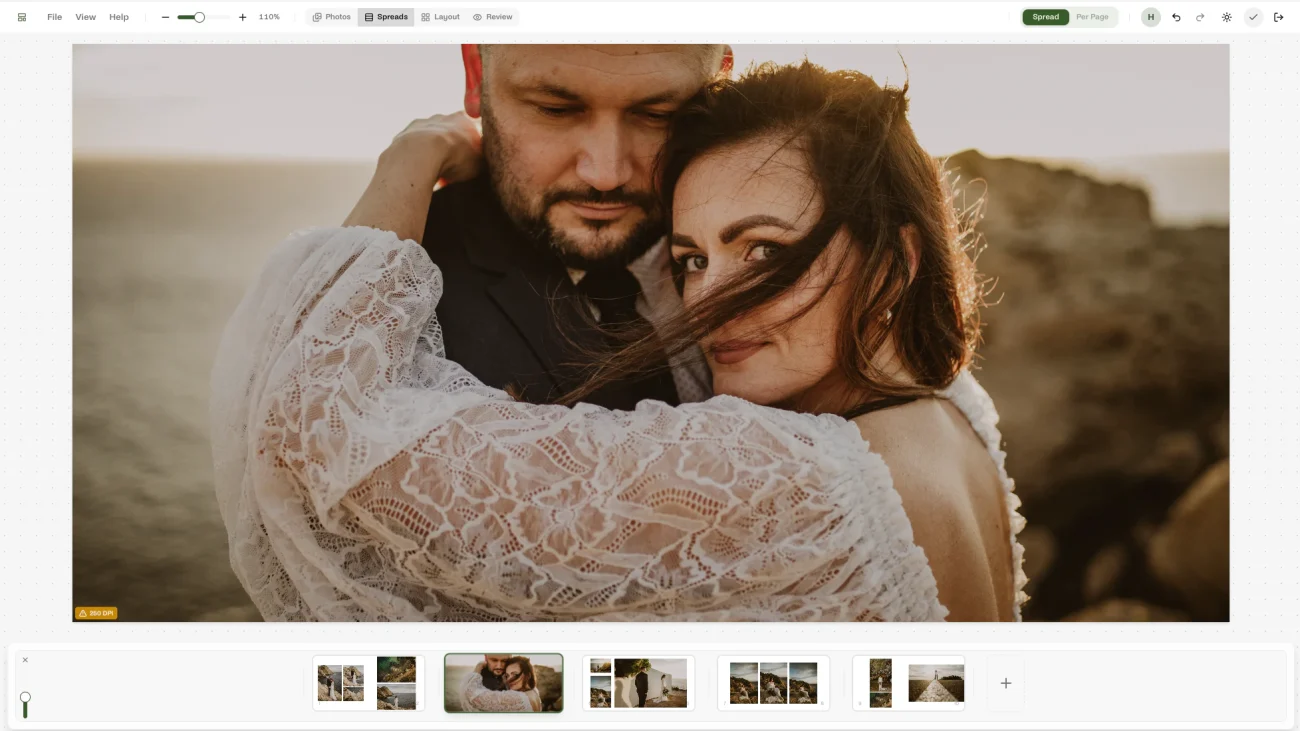
You start with your photos and your album. From there, Spreadu generates layouts based on the images you are actually using, not just a fixed library of one-size-fits-all designs. If you want a different direction, you can reshuffle and regenerate instead of rebuilding the whole thing from scratch.
Then comes the editing layer, and this is where the platform feels especially practical.
You can drag photos around, preview placement in real time, switch between different spread behaviors, and refine individual images with precise zoom, pan, and rotation controls. In other words, you are not handing your taste over to a machine. You are using a system that gets you much closer to a strong result before the manual work even begins.
There is also built-in client proofing for photographers, which is a big deal. Instead of turning proofing into another disconnected process, Spreadu lets photographers share album links, collect feedback, handle comments, and keep revisions attached to the spreads themselves. That means less back-and-forth in email threads, fewer “which page are you talking about?” moments, and a smoother experience for both photographer and client.
Once the album is ready, Spreadu supports print-ready exports and lab-oriented output, which matters if you want your photo album design software to fit into a real professional workflow rather than ending at the design stage.
There is also an AI assistant layer for tasks like finding albums, creating albums, and navigating workflow information. Used well, that becomes less of a gimmick and more of a practical time-saver.
If you want the quickest feel for the product, the public Spreadu Playground is probably the best starting point.
What makes Spreadu different from the competition
This is the part most photographers care about: why would you use this instead of a more traditional album tool?
The short version is that Spreadu seems to be competing on workflow quality, not just feature count.
First, it is browser-based. That immediately separates it from desktop-first tools that still feel like they belong to a different era of creative software. If you want a web-based album designer that feels current, that matters.
Second, it is built around generated layouts rather than rigid template dependence. That does not mean photographers lose structure. It means the structure is more adaptive. You are not choosing from a finite bucket of looks and hoping one fits. The system is trying to build something that fits your actual photo set.
Third, Spreadu makes a serious point about protecting the frame. For photographers, that is not a minor technical detail. It is a values statement. The composition was intentional when you shot it. Your album software should not casually undo that work.
Fourth, the proofing experience is not treated like a premium afterthought. Spreadu includes client proofing as part of the core story, not as some awkward extra layer that only appears after you upgrade.
Fifth, the platform clearly understands that album design is not just a design problem. It is a business problem. Faster workflows mean faster delivery. Faster delivery means better client experience. Better client experience makes albums easier to sell. Easier album sales mean higher revenue from work you are already shooting.
That is a more complete way to think about album design software for photographers.
Why this matters for photographers who want to grow
One of the smartest angles in the Spreadu story is that albums are not framed as a side product. They are framed as a high-value part of the photography business.
And that is true.
For many photographers, albums are one of the best opportunities to increase revenue, deepen client satisfaction, and create something lasting from a shoot. The problem is not that photographers do not believe in albums. The problem is that too many workflows make albums feel slow, fiddly, and hard to scale.
Spreadu is clearly trying to remove that friction.
If albums become easier to design, easier to proof, and easier to deliver, they become easier to offer confidently. That alone can change how a photographer thinks about post-shoot sales.
So this is not only about prettier software. It is about making the album side of the business feel more realistic, more repeatable, and more worth pushing.
Who should seriously look at Spreadu
If your current process already feels fast, flexible, and creatively respectful, then great. But if you recognize yourself in any of these, Spreadu is worth a closer look:
- you are tired of templates deciding too much
- you hate watching software auto-crop strong images
- you want a cleaner wedding album design workflow
- you want client proofing built into the process
- you want to work in the browser instead of babysitting a desktop app
- you want to spend more time shooting and less time wrestling layouts
That is why I think Spreadu will be especially interesting for photographers who are not just shopping for another tool, but actively looking for a better system.

Final thoughts
There is no shortage of software in photography. What is rare is software that feels like it actually understands the emotional and practical cost of bad workflow.
Spreadu feels interesting because it is not just asking, “How do we help photographers make albums?” It is asking a much better question: “How do we help photographers make albums faster, with more confidence, without disrespecting the photos?”
That is a product story I can get behind.
If you want to explore it yourself, start with the main Spreadu website, take a look at the about page to understand the philosophy behind it, try the playground to get a feel for the workflow, and check the pricing page if you want to see how they package it for different kinds of photographers.
If you have been looking for photo album design software, wedding album design software, or client proofing for photographers that feels more modern, more intuitive, and a lot more respectful of the work you put into every frame, Spreadu absolutely deserves a spot on your radar.